
Respect my work! or BTC: 1MTFbBSKrocPK7G6GKfG8RoTw5N57WnnNa  If you have paid donate send me e-mail with Your data or transaction number to receive an access code to articles with limited access. |
PmWiki /
Example of Internal RTF reportShortcut table
We want to create simple report, that basing on internal ProReports database wil generate *.rtf file with table filled with users. Additionally report will be presenting other possibilities related to RTF documents:
In example was used plugin class_rtf.php which makes it much easier to create RTF documents. First step is to register report using prepared earlier [FormsRej|form]] LOGIN. When registering using plugin list (Other files) we choose plugin class_rtf.php: 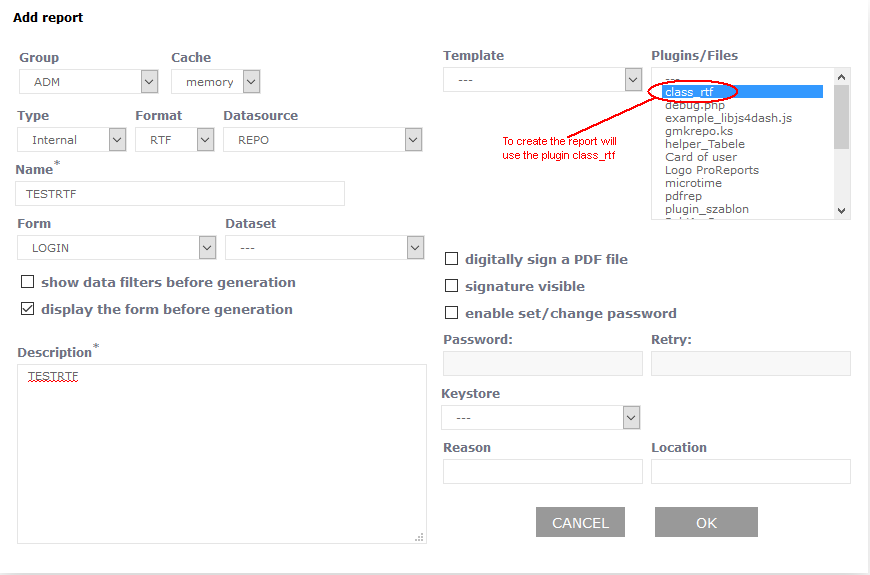 Next we register elements of a report. Report example - option A
In first part of section Expresion/Code before Template we define RTF document. Amongst other things we set page size as A4 (function setPaperSize) and it's orientation - Portrait (function setPaperOrientation). We set list of colors that will be used in document (function AddColor):
$V[rtf]=new rtf(0,24,1);
$V[rtf]->setPaperSize(5);
$V[rtf]->setPaperOrientation(1);
$V[rtf]->setDefaultFontFace(0);
$V[rtf]->setDefaultFontSize(12);
$V[rtf]->setAuthor("ProReports");
$V[rtf]->setOperator("");
$V[rtf]->setTitle("USERS");
$V[rtf]->addColour("#000000");
$V[rtf]->addColour("#666666");
$V[rtf]->addColour("#00ff00");
$V[rtf]->addColour("#ffffff");
If you want to use ProReports logo in header you have to "import" image creating variable [img]:
$V[img]=$V[rtf]->imageContent("../rep/files/logoprot.png",3,1);
and then you can use it by defining both header and footer of a report:
$V[rtf]->addText("{\header\fs20 $V[img]<strong>User list</strong>}
{\footer\fs12First footer line\line Second footer line\line
Page:\chpgn}");
Further we want to show you headers:
$V[rtf]->addText("{\fs12 <H1>ProReports' users list</H1>}");
$V[rtf]->addText("{\fs12 <H2>ProReports' users list</H2>}");
$V[rtf]->addText("{\fs12 <H3>ProReports' users list</H3>}");
and differently formatted text:
$V[rtf]->addText("{\fs12 }<BR><BR>");

$V[rtf]->addText("{\fs12 <strong>Exemplary bold text</strong>}<BR>");

$V[rtf]->addText("{\fs12  <U>PExemplary underlined text</U>}<BR>");

$V[rtf]->addText("{\fs12  \cf3Exemplary colored text}<BR>");

$V[rtf]->addText("{\fs12  <strike>Exemplary strike through text</strike>}<BR>");

$V[rtf]->addText("{\fs12  <EM>Exemplary italic text</EM> }<BR><BR>");

$V[rtf]->addText("{\pard\fs12\cbpat2\cf4  Exemplary text with different background\par}<BR><BR>");

$V[rtf]->addText("{\fs12 Possibility to use as a line;:}<BR>");

$V[rtf]->addText("{\pard\fs4\cbpat2\cf2  \par}<BR><BR>");

$V[rtf]->addText("{\fs12 or:}<BR>");

$V[rtf]->addText("{\pard {\*\do\dobxcolumn\dobypara\dodhgt\dpline\dpxsize9200\dplinesolid\dplinew10}\par}<BR>");
and formatted paragraphs:
$V[rtf]->addText("{\pard \pvpg\phpg \posx9097\posy755\absh-557\absw1600
\brdrt \brdrs \brdrw10 \brsp20
\brdrl \brdrs \brdrw10 \brsp80
\brdrb \brdrs \brdrw10 \brsp20
\brdrr \brdrs \brdrw10 \brsp80
Here example of paragraph is set in fixed place.
\par}") ;
$V[rtf]->addText(" {\pard\qc\fs20 <strong>Paragraph \'a71 - </strong> Test\par}<BR>");
$V[rtf]->addText("{\pard\fi480\\fs16\qj Example of text presenting using quotes. Notice that text starts
with a paragraph and it is justified (qj). Above it we can see centred text (qc). All you can see here
is used to show displaying text in multiple lines, so effect of justifying is more visible.\par}<BR><BR>");
$V[rtf]->addText(" {\pard
\brdrt \brdrs \brdrw10 \brsp20
\brdrl \brdrs \brdrw10 \brsp80
\brdrb \brdrs \brdrw10 \brsp20
\brdrr \brdrs \brdrw10 \brsp80
\fs16\qc Here in example of paragraph with frame
\par}<BR>");
Lastly we define table's header. It's the table that holds system' usernames:
$V[rtf]->openTable("center") ;
$V[rtf]->addRow(array(
                  array("font-color"=>1,
                      "font-size"=>12,
	      "align"=>"center",
	      "width"=>2,
	      "border"=>"lrtb",
	      "bgcolor"=> 2,
	      "value"=>"<strong>Login</strong>"),
                  array("font-color"=>1,
                      "font-size"=>12,
	      "align"=>"center",
	      "width"=>6,
	      "border"=>"lrtb",
	      "bgcolor"=> 2,
	      "value"=>"<strong>Name and Surname</strong>"),
                  array("font-color"=>1,
                      "font-size"=>12,
	      "align"=>"center",
	      "width"=>3,
	      "border"=>"lrtb",
	      "bgcolor"=> 2,
	      "value"=>"<strong>City</strong>")
                   ));
Remaining definition part will be described in element B.
At this point the table is being closed and added to document: $V[rtf]->closeTable(); $V[rtf]->addText($V[rtf]->getTable() ."<BR>"); At the end of RTF document we have to assign to variable $V[out]: $V[out]=$V[rtf]->getDocument(); that needs to entered in section Template. While generating a report as a result of elements processing value on variable $V[out] (and RTF document aswell) is passed to output file of a report saved as *.rtf file. Report example - option BAs you can see this report isn't very complex. Despite that definitions of element are quite complex (especially section Expresion/Code before Template). To avoid this we can overwrite for our report some custom report plugin PHP and most of element definitions move inside this plugin. Report will gain more readability and versatility. Report can be edited and from list of used plugin you need to unmark class_rtf.php plugin, because it will be imported in basic plugin. Here is the code of mentioned plugin testrtfv2.php:
<?
include "../rep/files/class_rtf.php";
function testrtfv2_select_exp_Helper()
{
$out=array(
"__init_rtf"=>"__init_rtf(\\\$P,\\\$V,\\\$F);\\r\\n",
"__samples_rtf"=>"__samples_rtf(\\\$P,\\\$V,\\\$F);\\r\\n",
"__init_table_rtf"=>"__init_table_rtf(\\\$P,\\\$V,\\\$F);\\r\\n",
"__row_table_rtf"=>"__row_table_rtf(\\\"<elements name goes here>\\\",\\\$P,\\\$V,\\\$F);\\r\\n",
"__done_rtf"=>"\\\$V[out]=__done_rtf(\\\$P,\\\$V,\\\$F);\\r\\n",
);
return $out;
}
function _cut_array($prefix,$arr)
{
$out=array();
foreach ($arr as $key=>$val)
{
$nkey=eregi_replace($prefix ."_","",$key) ;
$out[$nkey]=$val ;
}
return $out ;
}
function __init_rtf(&$P,&$V,&$F)
{
$V[rtf]=new rtf(0,24,1);
$V[rtf]->setPaperSize(5);
$V[rtf]->setPaperOrientation(1);
$V[rtf]->setDefaultFontFace(0);
$V[rtf]->setDefaultFontSize(12);
$V[rtf]->setAuthor("ProReports");
$V[rtf]->setOperator("");
$V[rtf]->setTitle("USERS");
$V[rtf]->addColour("#000000");
$V[rtf]->addColour("#666666");
$V[rtf]->addColour("#00ff00");
$V[rtf]->addColour("#ffffff");
}
function __samples_rtf(&$P,&$V,&$F)
{
$V[img]=$V[rtf]->imageContent("../rep/files/logoprot.png",3,1);
$V[rtf]->addText("{\header\fs20 $V[img]<strong>User list</strong>}
{\footer\fs12First footer line\line Second footer line\line Page:\chpgn}");
$V[rtf]->addText("{\fs12 <H1>ProReports user list</H1>}");
$V[rtf]->addText("{\fs12 <H2>ProReports user list</H2>}");
$V[rtf]->addText("{\fs12 <H3>ProReports user list</H3>}");
$V[rtf]->addText("{\fs12 }<BR><BR>");
$V[rtf]->addText("{\fs12 <strong>Exemplary bold text</strong>}<BR>");
$V[rtf]->addText("{\fs12 <U>Exemplary underlined text</U>}<BR>");
$V[rtf]->addText("{\fs12 \cf3Exemplary colored text}<BR>");
$V[rtf]->addText("{\fs12 <strike>Exemplary strike through text</strike>}<BR>");
$V[rtf]->addText("{\fs12 <EM>Exemplary italic text</EM> }<BR><BR>");
$V[rtf]->addText("{\pard\fs12\cbpat2\cf4 Exemplary text with different background\par}<BR><BR>");
$V[rtf]->addText("{\fs12 Possibility to use as a line:}<BR>");
$V[rtf]->addText("{\pard\fs4\cbpat2\cf2 \par}<BR><BR>");
$V[rtf]->addText("{\fs12 albo:}<BR>");
$V[rtf]->addText("{\pard {\*\do\dobxcolumn\dobypara\dodhgt\dpline\dpxsize9200\dplinesolid\dplinew10}\par}<BR>");
$V[rtf]->addText("{\pard \pvpg\phpg \posx9097\posy755\absh-557\absw1600
\brdrt \brdrs \brdrw10 \brsp20
\brdrl \brdrs \brdrw10 \brsp80
\brdrb \brdrs \brdrw10 \brsp20
\brdrr \brdrs \brdrw10 \brsp80
Here example of paragraph is set in fixed place.
\par}") ;
$V[rtf]->addText(" {\pard\qc\fs20 <strong>Paragraph \'a71 - </strong> Test\par}<BR>");
$V[rtf]->addText("{\pard\fi480\\fs16\qj Here you can see text in quotes ( \"we have presentation of using single quote
- Peter's\"). Notice that text starts with a paragraph and it is justified. Above it we can see centred text (qc).
All you can see here is used to show displaying text in multiple lines, so effect of justifying is more visible.\par}<BR><BR>");
$V[rtf]->addText(" {\pard
\brdrt \brdrs \brdrw10 \brsp20
\brdrl \brdrs \brdrw10 \brsp80
\brdrb \brdrs \brdrw10 \brsp20
\brdrr \brdrs \brdrw10 \brsp80
\fs16\qc Example of paragraph with frame
\par}<BR>");
}
function __init_table_rtf(&$P,&$V,&$F)
{
$V[rtf]->openTable("center") ;
$V[rtf]->addRow(array(
array("font-color"=>1,
"font-size"=>12,
"align"=>"center",
"width"=>2,
"border"=>"lrtb",
"bgcolor"=> 2,
"value"=>"<strong>Login</strong>"),
array("font-color"=>1,
"font-size"=>12,
"align"=>"center",
"width"=>6,
"border"=>"lrtb",
"bgcolor"=> 2,
"value"=>"<strong>Name and Surname</strong>"),
array("font-color"=>1,
"font-size"=>12,
"align"=>"center",
"width"=>3,
"border"=>"lrtb",
"bgcolor"=> 2,
"value"=>"<strong>City</strong>")
));
}
function __row_table_rtf($elem,&$P,&$V,&$F)
{
// rewriting data from $F table to $R but without $elemn prefix
$R=_cut_array($elem,$F) ;
$V[rtf]->addRow(array(
array("font-color"=>1,
"font-size"=>12,
"align"=>"center",
"width"=>2,
"border"=>"lrtb",
"bgcolor"=> 0,
"value"=>"$R[login]"),
array("font-color"=>1,
"font-size"=>12,
"align"=>"left",
"width"=>6,
"border"=>"lrtb",
"bgcolor"=> 0,
"value"=>"$R[name] $R[surname]"),
array("font-color"=>1,
"font-size"=>12,
"align"=>"right",
"width"=>3,
"border"=>"lrtb",
"bgcolor"=> 0,
"value"=>"$R[city]")
));
}
function __done_rtf(&$P,&$V,&$F)
{
$V[rtf]->closeTable();
$V[rtf]->addText($V[rtf]->getTable() ."<BR>");
$V[rtf]->addText("{\fs12 }<BR>");
$V[rtf]->addText("{\fs12 ___________________________________}<BR>");
$V[rtf]->addText("{\fs12 <EM>(signature)</EM> }<BR><BR>");
return $V[rtf]->getDocument();
}
?>
It's worth noting that we don't need to use decoding of polish letters what helps greatly with text editing. At first helper was added - it helps with using plugin when registering report elements: 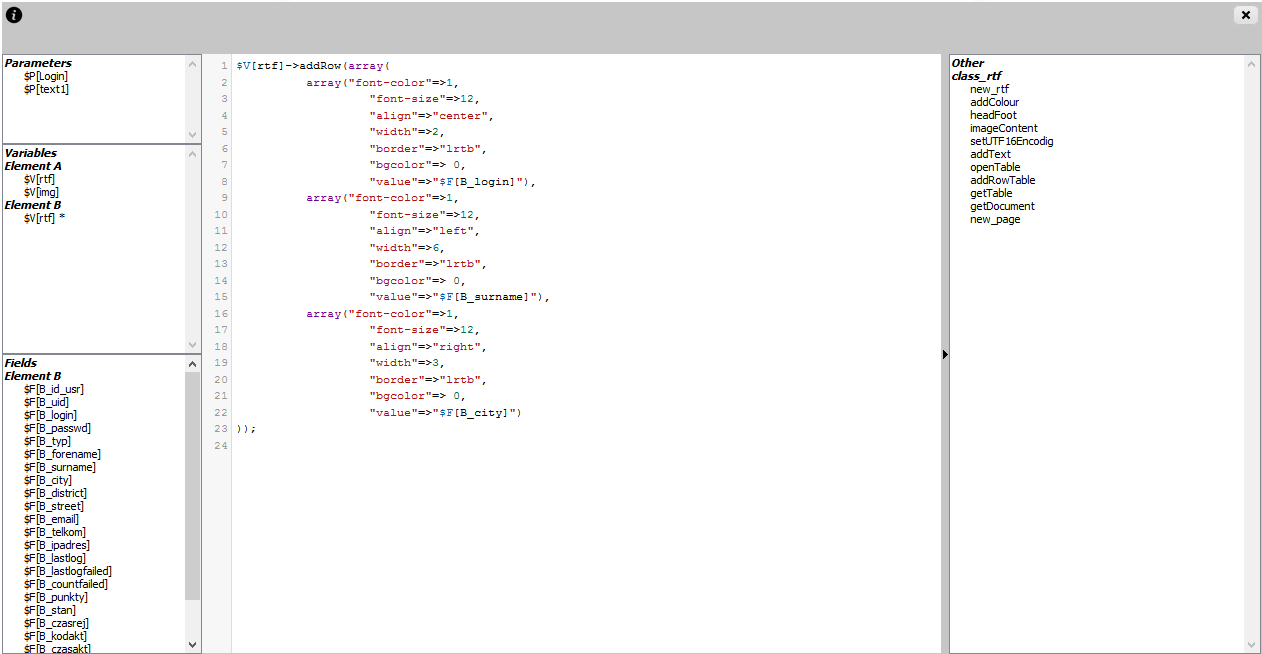 Plain report elements look like this:
After compiling report we can run it by choosing Execute option: 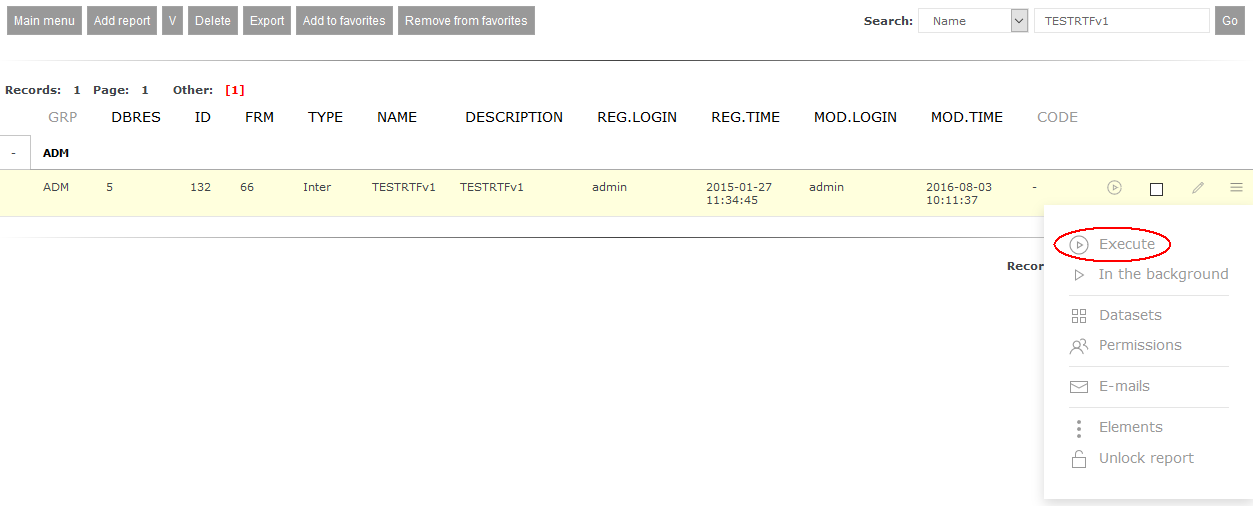 Before generating it form linked with report will be shown: 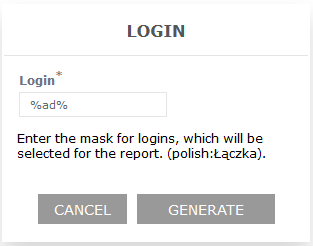 Using option Generate will start process of generating report which will result in receiving *.rtf file: 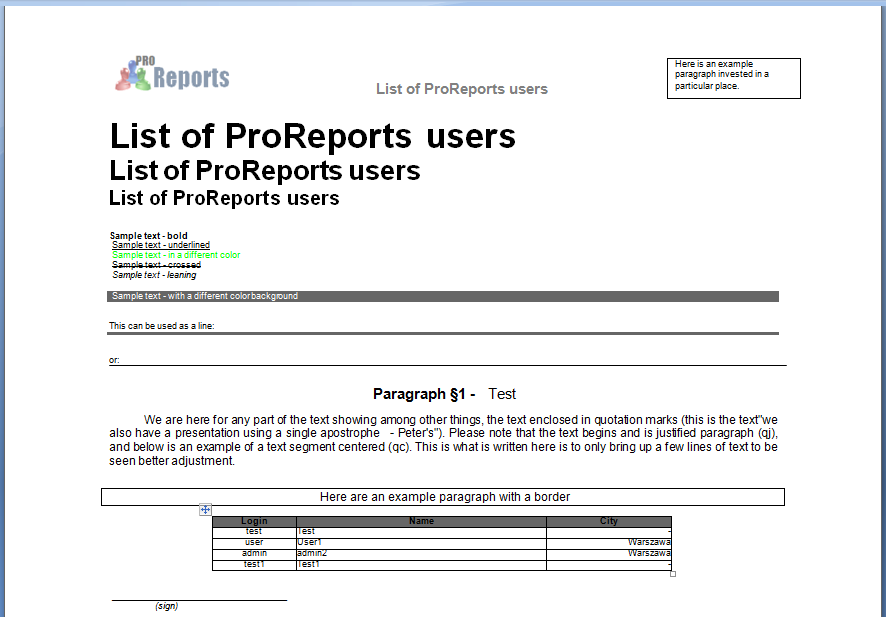 This report type is great for generating all kind of contracts or agreements. It's worth noticing that you can easily create database that will store definition of texts used in this kind of report. Combining text and data can be achieved using symbols e.g. in format
$keys=array_keys($F);
$ile=count($keys)   ;
for ($x=0;$x<$ile;$x++)
{
$tekst=eregi_replace("^^". $keys[$x] . "^^",$F[$keys[$x]],$tekst);
}
to change used symbols from values obtained from database. This page may have a more recent version on pmwiki.org: PmWiki:RepInternalRTF, and a talk page: PmWiki:RepInternalRTF-Talk. |